Autonomous AI agents for penetration testing
Describe a target and a goal. PentAGI plans the work, runs the tools in an isolated sandbox, learns from every step and reports what it found. Open source and self-hosted.
- A team of specialized agents plans the test, researches, exploits and writes the report
- 20+ professional tools such as nmap, Metasploit and sqlmap, isolated in Docker
- Any LLM: cloud providers, local models, or your own gateway
For authorized security testing only. See the Terms of Use.
Works with the models you already use
- OpenAI
- Anthropic
- Google Gemini
- AWS Bedrock
- Ollama
- DeepSeek
- Mistral
- xAI
- Qwen
- Kimi
- GLM
- MiniMax
Plus any OpenAI-compatible endpoint — vLLM, LiteLLM, OpenRouter, DeepInfra and others — as a custom provider.
And searches the web and exploit databases with
- DuckDuckGo
- Tavily
- Firecrawl
- Traversaal
- Perplexity
- Sploitus
- SearXNG
How it works
An autonomous pentest, end to end
Every flow runs through a team of specialized agents. Each agent type has its own prompt and tools, you choose its model, and every command runs in an isolated container — never on your host.
Goal
You describe the target and what to test, in plain language.
Plan
The generator breaks each task into subtasks; the refiner revises the plan as results come in.
Research
The searcher gathers fresh context from the web and exploit databases; the memorist recalls what the flow already found.
Execute
The pentester, coder and installer run commands in an isolated container with Kali Linux tools.
Report
The reporter sums up each task, and the flow report exports as Markdown or PDF.
Memory under every step. Every command and result goes into the flow's vector memory, and guides, answers and code that worked go into a knowledge base that later flows search. An optional knowledge graph links hosts, services and findings.
Product tour
See every step the agents take
PentAGI shows the plan, the commands and the results as they happen, and keeps them for later.
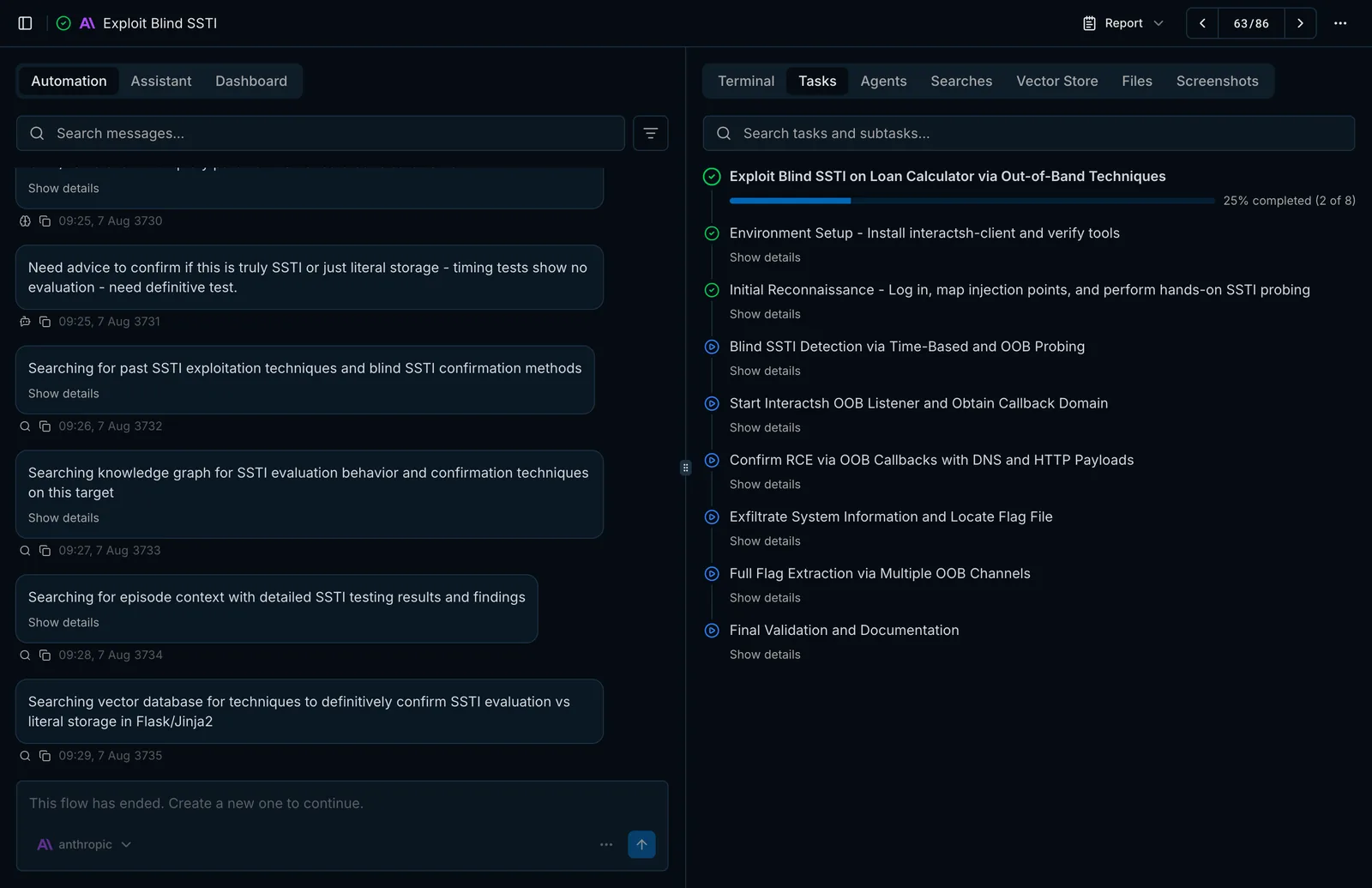
Capabilities
Everything a pentest team needs, in one self-hosted platform
The open-source edition ships the full agent stack: planning, execution, memory, tools, reporting and monitoring.
Testing and automation
- Breaks each goal into subtasks and works through them without an operator
- Interactive assistant with the same tools as the agents
- Many tasks in one flow for long work on a single scope
- Several flows running in parallel
AI agents
- A team of specialized agents: pentester, coder, installer, searcher and more
- Planning, progress tracking and loop detection
- Execution monitoring and task planning for smaller open models
Memory and knowledge
- Long-term memory with vector search over every command and result
- Knowledge base of instructions and code reused across flows
- Optional knowledge graph of hosts, services and findings
- Chain summarization keeps long flows within the context window
Tools and integrations
- 20+ professional Kali Linux tools in an isolated container
- Unified web search with automatic engine selection and fallback
- REST and GraphQL APIs with Bearer tokens for your own automation
Browser, files, terminal
- Web pages as Markdown, HTML or links, plus screenshots
- Upload documentation, code and binaries into a flow
- Pull files out of the sandbox and save them as resources
Reporting and analytics
- Flow reports as Markdown or PDF
- Token usage and cost by provider, model and agent; tool calls by function
Deployment and teamwork
- Installer with a setup wizard that catches common mistakes
- Any LLM provider, including local models and gateways such as LiteLLM
- Multi-user work with roles and permissions
- Grafana, OpenTelemetry, Jaeger, Loki and Langfuse monitoring
Go deeper in the documentation
How the agents plan and delegate, what they remember, and how to configure models, search and deployment.
Safeguards
Autonomous, not unbounded
Limits, repeat detection and isolation are built into every flow, so an agent that gets stuck stops instead of looping indefinitely.
Every agent has a turn limit
The main agents stop after 100 model turns and the others after 20. Both are defaults you can change.
Repeats are caught
From the third identical tool call in a row the tool is not run again and the agent is told to change course. The seventh stops the agent.
Back to work, not to chat
When a model answers in prose instead of acting, the reflector steers it back to a tool call. After three failed rounds the agent stops.
Commands stay in the sandbox
Terminal commands and file operations run in the flow's own container, never in the PentAGI container, and can move to a separate worker node.
What's new in 2.2
More models, fewer dead ends
More model providers
Mistral, xAI and MiniMax join the built-in list; Azure OpenAI and the OpenCode Go plan work through the custom provider.
Provider failover
A failed model call is repeated on a fallback provider, and the switch is recorded on the trace.
Unified web search
One web_search tool picks the best engine for links, answers, research or exploits, retries and falls back on its own. Firecrawl and an internal browser-based engine are new.
Keyless Anthropic
Anthropic can authenticate with Workload Identity Federation instead of a long-lived API key.
Editions
Start open source, grow into Enterprise
Both editions are self-hosted and share the platform — flows, sandbox, tools and memory. Enterprise adds agent profiles with sub-agents, client-ready delivery and support.
Open Source
MITThe complete agent platform for researchers and security teams who run it themselves.
- Autonomous flows and the interactive assistant
- Sandboxed tools, memory, web search and browser
- Flow reports as Markdown or PDF
- Analytics, Langfuse and Grafana monitoring
- Community support on GitHub and Discord
Enterprise
3.0Everything in Open Source, plus what consultancies and in-house red teams need to deliver.
- Customer-ready report templates with DOCX export
- Agent profiles and sub-agents
- Plugins and your own MCP servers
- Live attack-chain dashboard
- Commercial license and support
Install
Up and running in minutes
You need Docker with Docker Compose, 2 vCPU, 4 GB of RAM, 25 GB of disk and Internet access, plus access to at least one LLM provider.
Interactive installer
Checks your system, configures providers and search engines, hardens the setup and deploys the stack.
Docker Compose
Download the environment file, add at least one LLM provider key, create the provider configuration files and start the stack. The web console opens at https://localhost:8443.
mkdir -p ~/pentagi && cd ~/pentagi
test -f .env || curl -fo .env.new https://raw.githubusercontent.com/vxcontrol/pentagi/main/.env.example
test -f .env.new && openssl rand -hex 32 | xargs -I VALUE sed -E -i.bak 's/^COOKIE_SIGNING_SALT=salt( .*)?$/COOKIE_SIGNING_SALT=VALUE/' .env.new
test -f .env.new && openssl rand -hex 16 | xargs -I VALUE sed -E -i.bak 's/^PENTAGI_POSTGRES_PASSWORD=postgres( .*)?$/PENTAGI_POSTGRES_PASSWORD=VALUE/' .env.new
test -f .env || mv .env.new .env
touch example.custom.provider.yml example.ollama.provider.yml example.bedrock.provider.yml
curl -O https://raw.githubusercontent.com/vxcontrol/pentagi/main/docker-compose.yml
test -f .env && docker compose up -dCommunity
Built in the open
PentAGI is developed on GitHub together with the security community.
GitHub
33.4k stars · 5.2k forks
Star the repository, follow releases, report issues and send pull requests.
Discord
Community chat
Ask questions, share flows and talk to the team building PentAGI.
Telegram
News and discussion
Release announcements and a place to discuss them.
Found a bug or missing a feature? Open an issue or send a pull request. Meet the contributors
FAQ
Questions, answered
Is PentAGI really open source?
Yes. The open-source edition is released under the MIT License on GitHub, and you run the whole stack on your own infrastructure.
Which language models can I use?
OpenAI, Anthropic, Google Gemini, AWS Bedrock, Ollama, DeepSeek, Mistral, xAI, Qwen, Kimi, GLM and MiniMax are built in, and any OpenAI-compatible endpoint — vLLM, LiteLLM, OpenRouter, DeepInfra and others — works as a custom provider.
Does my data leave my environment?
PentAGI is self-hosted. Data from your flows goes to the model providers and search engines PentAGI is set up to use. DuckDuckGo search is on by default, so to keep that data on your network, use a local model and embedding model, self-hosted search and DUCKDUCKGO_ENABLED=false. Within two minutes of starting and then every three hours, the server also reports its version, platform and a summary of its configuration and usage — provider types, feature switches and counts, nothing anybody wrote — to update.pentagi.com, tagged with its installation ID and license key, if one is set; set UPDATE_CHECK_INTERVAL=0 to turn that off. Each time the installer starts and after each action it runs, it sends the installed images and the state of each stack, plus the same summary while PentAGI is running; UPDATE_CHECK_INTERVAL does not affect it.
Where do the tools run?
In isolated Docker containers created for each flow, never on the host. For production, run them on a separate hardened worker node.
What stops an agent from looping and burning tokens?
Every agent has a limit on model turns. From the third identical tool call in a row the tool is not run again, and the seventh stops the agent. The reflector steers a model that stops using tools back to work. All of this is on by default.
What do I need to run it?
Docker with Docker Compose, 2 vCPU, 4 GB of RAM, 25 GB of disk and Internet access, plus access to at least one LLM provider. The interactive installer checks the rest.
What does Enterprise add?
Customer-ready report templates with DOCX export, agent profiles and sub-agents, plugins and your own MCP servers, the live attack-chain dashboard and commercial support. Licenses are managed in the PentAGI Console.
Can I use it against any target?
No. Use PentAGI only against systems you own or are explicitly authorized to test.
Run your first autonomous pentest today
Install the open-source edition in minutes, or talk to us about Enterprise for your team.