Reports
Customer-ready documents generated from a flow, with templates and branding.
Enterprise turns a flowflowOne run of PentAGI: a goal, the tasks created from your messages, and everything the agents did along the way. into a finished document instead of an export of taskstaskOne request in a flow: its first message, or a later message that does not answer an agent's question. PentAGI splits each task into subtasks. and subtaskssubtaskOne step of a task. PentAGI plans the subtasks of each task and adjusts them as the work goes on..
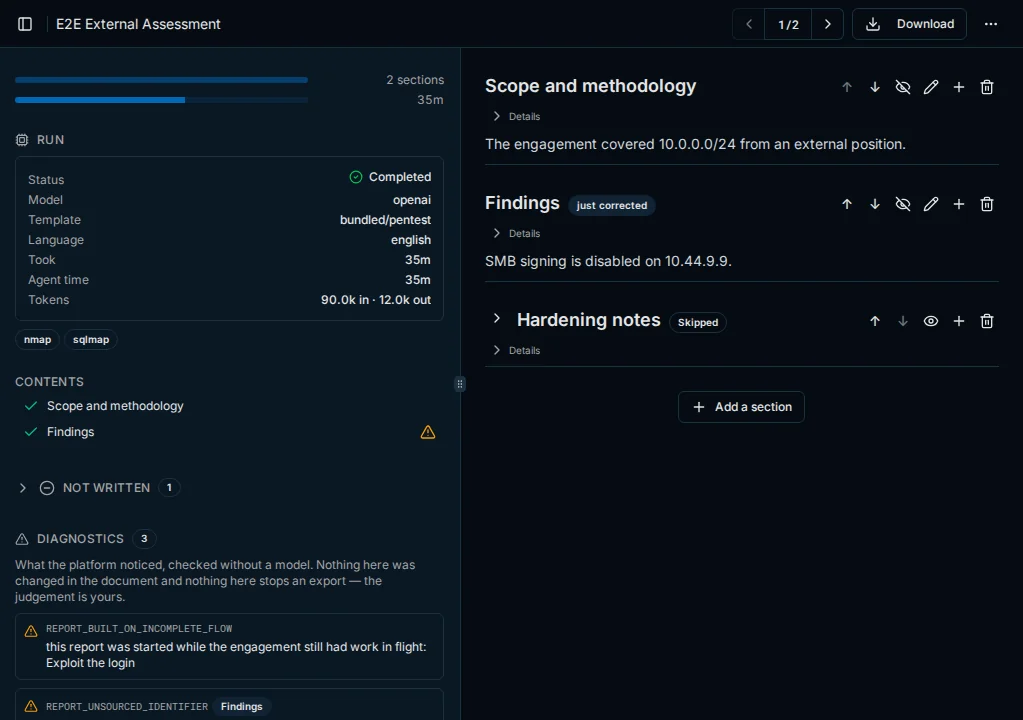
- Templates decide the structure. Enterprise ships one, PentAGI Penetration Testing ReportreportThe document PentAGI writes about a flow and its findings. In Enterprise, it is a customer-ready document built from a template. (Default), which nobody can edit: copy it, or create or import your own in Settings → Report Templates — for example separate documents for the customercustomerThe client who receives the pentest and its report., the engineers and management.
- Generation starts from the flow's Reports tab with Create report and walks the templatetemplateSaved text that PentAGI reuses. A template saved in Templates fills in the first message of a new flow; in Enterprise, a report template sets the sections of a report and their order, so different templates produce different documents for the customer, the engineers and management. section by section; a composer agentagentAn AI agent of PentAGI: a model with its own prompt, settings and tools that does one kind of work in a flow, such as testing, writing code or searching the web. on the
advisermodel writes the narrative sections from the flow's data, while the cover, the metrics and tables such as the severity distribution, the step-by-step attack chainattack chainThe sequence of steps that led to access, from the first finding to the goal of the test. and the toolstoolWhat an agent acts through: a built-in capability such as the terminal, the isolated browser or web search, or a program in the sandbox such as nmap, metasploit or sqlmap. used are assembled without a model; repeating sections are expanded for every item they cover, such as individual findingsfindingSomething the test discovered and recorded, such as a host, a running service or a vulnerability.. - Editing — operators can edit sections, attach files and apply branding; a reviser agent on the
assistantmodel applies requested corrections. - Diagnostics check the finished report deterministically, for example flagging identifiers that do not appear in the flow. They advise and never rewrite.
- Export to Markdown, PDF or Word (DOCX), or download an Archive (ZIP) that carries the report with its files beside it. PDF carries the template's theme, logo and cover image; Word carries the cover logo and built-in styles unless Page Header/Footer → Apply the template theme to Word exports is on; Markdown carries no branding.
Last updated on
Plugins and MCP
Extend Enterprise agents with portable plugins and skills in the agent-plugins.org format and with your own MCP servers over Streamable HTTP or SSE.
Knowledge graph and analytics
How the knowledge graph links hosts, services, vulnerabilities and access, its two backends, and the attack-chain dashboard built from it.