Agent profiles
Roles as data — a prompt, a model preset and an ordered tool list per agent.
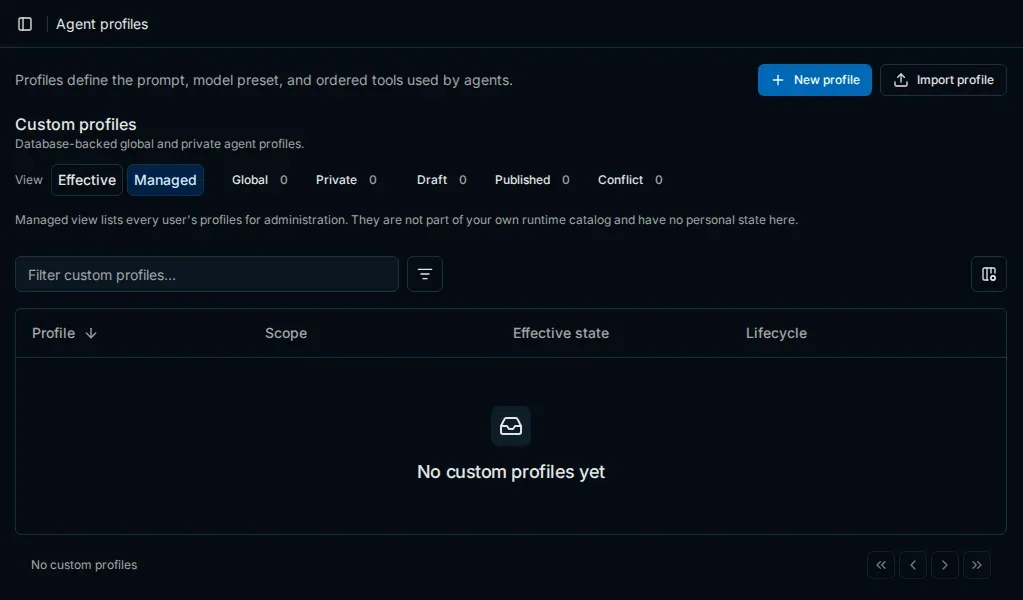
In Enterprise, an agentagentAn AI agent of PentAGI: a model with its own prompt, settings and tools that does one kind of work in a flow, such as testing, writing code or searching the web. is defined by a profile: its role, base prompt, model preset and the toolstoolWhat an agent acts through: a built-in capability such as the terminal, the isolated browser or web search, or a program in the sandbox such as nmap, metasploit or sqlmap. it may use. A planner chooses the profile for each subtasksubtaskOne step of a task. PentAGI plans the subtasks of each task and adjusts them as the work goes on., so the specialist that runs matches the work.
Built-in profiles
| Group | Profiles |
|---|---|
| Working agents | universal, pentester, coder, installer, researcher, recon |
| Interactive | assistant |
| Pipeline | planner, subagent_, generator, refiner, reporter, enricher, report_, composer, reviser |
PluginspluginIn Enterprise, a package in the open Agent Plugins format that adds skills, MCP servers and agent profiles. can ship their own profiles, and you can create custom ones in Settings → Agent Profiles — administrators for everyone, other users for themselves.
Working profiles have On, Default and Off switches: administrators set the Default for users, and each user can override it under My state for built-in profiles or My override for custom ones. Default follows PROFILES_ — auto, the default, offers the profile to the planner, while manual offers it only once it is switched On. With no working profile enabled, the tasktaskOne request in a flow: its first message, or a later message that does not answer an agent's question. PentAGI splits each task into subtasks. stops with an error.
Planner and execution monitor
Before every subtask, the planner chooses the working profile, the plugins and a short checklist. It always runs — Enterprise has no AGENT_ — on the adviser model of the flowflowOne run of PentAGI: a goal, the tasks created from your messages, and everything the agents did along the way.'s providerproviderA service or server that gives PentAGI its language models, such as OpenAI, Anthropic or a local Ollama., and after three invalid answers it falls back to universal.
Execution monitoring is on by default (EXECUTION_). After 20 calls in a row to the same tool (EXECUTION_), 40 tool callstool callA request from the model to run one of the agent's tools, such as a terminal command or a web search. since the last check (EXECUTION_), or at half and three quarters of the subtask's time budget, a short check on the simple_ model decides whether the agent is stuck. Only then does the adviser review the agent's work — for profiles that carry the advice tool, and while at least five minutes of the budget remain.
Sub-agents and budgets
Working agents can start sub-agentssub-agentIn Enterprise, an agent that a working agent starts for parallel work inside a subtask. for parallel work inside a subtask with spawn_, follow them with agent_, agent_ and agent_, and stop them with agent_. Time budgets handed down from the task to each subtask, a cap on subtasks per task and a ceiling on concurrent sub-agents keep delegation under control. Set them when you start a flow, together with a context preset — Compact, Balanced or Spacious — that the summarizer aims for.
A new flow's defaults come from AGENT_ (10800, three hours of agent work for each task), AGENT_ (15 per task), AGENT_ (10) and SUMMARIZER_. On a running flow, change them under Preferences; changes apply from the next task. Concurrent sub-agents set to Disabled removes the sub-agent tools from every agent of the flow, the assistantassistantThe interactive mode: you work with an agent in a chat and decide on the next step together. included.
Last updated on
Enterprise overview
What PentAGI Enterprise 3.0 adds to the open-source edition — agent profiles, plugins and MCP servers, customer-ready reports and a live attack-chain view.
Plugins and MCP
Extend Enterprise agents with portable plugins and skills in the agent-plugins.org format and with your own MCP servers over Streamable HTTP or SSE.