Enterprise
Reports
從 flow 中產生、可交付給 customer 的文件,包含 templates 與品牌識別。
Enterprise 將 flowflow — 流程PentAGI 的一次執行:一個目標、從您的訊息建立的任務,以及代理在此過程中執行的所有操作。 轉化為一份成品文件,而非僅是 taskstask — 任務流程中的一個請求:其第一則訊息,或後續未回答代理問題的訊息。PentAGI 會將每個任務拆分為子任務。 與 subtaskssubtask — 子任務任務中的一個步驟。PentAGI 會規劃每個任務的子任務,並隨著工作進度進行調整。 的匯出。
- Templates 決定結構。Enterprise 版本內建一份 PentAGI Penetration Testing Reportreport — 報告PentAGI 針對流程及其發現項目所撰寫的文件。在 Enterprise 中,這是一份根據範本建構、可直接交付客戶的文件。 (Default),任何人都無法編輯:您可以複製它,或在 Settings → Report Templates 中建立或匯入您自己的 templatetemplate — 範本PentAGI 可重複使用的已儲存文字。儲存在 Templates 中的範本會填入新流程的第一則訊息;在 Enterprise 中,報告範本規定報告的章節及其順序,因此不同的範本會為客戶、工程師和管理層產生不同的文件。 —— 例如針對 customercustomer — 客戶接收滲透測試及其報告的客戶。、工程師與管理層提供不同的文件。
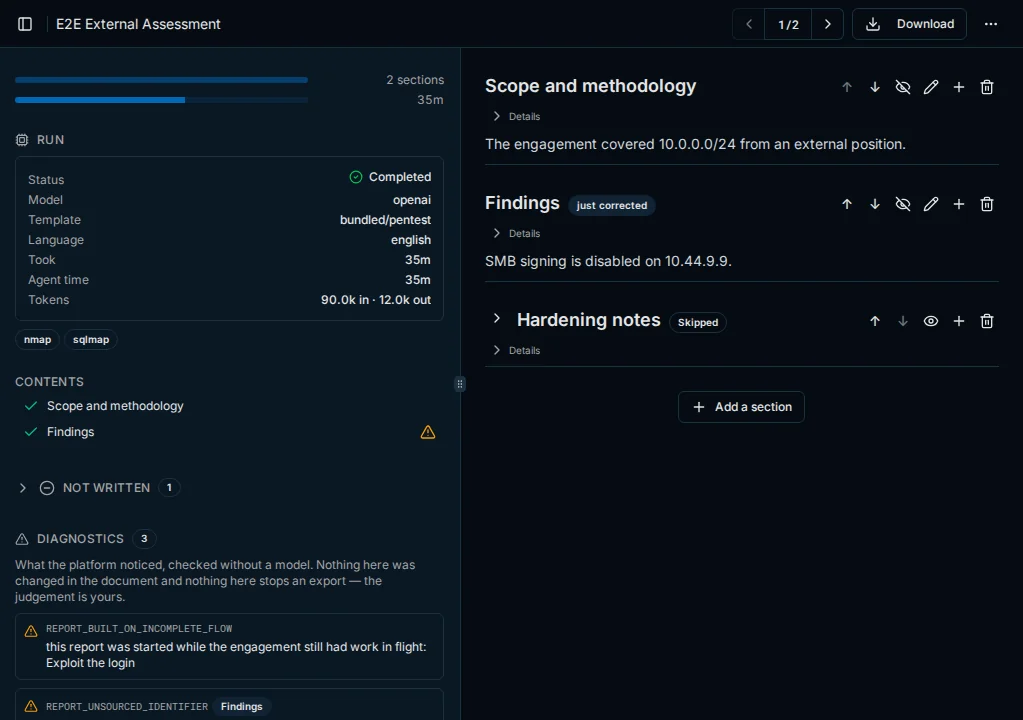
- 生成從 flow 的 Reports 分頁開始,點擊 Create report 後逐節處理 template;composer agentagent — 代理PentAGI 的 AI 代理:擁有專屬提示詞、設定與工具的模型,在流程中執行特定類型的工作,例如測試、撰寫程式碼或搜尋網路。 會使用
adviser模型根據 flow 資料撰寫敘述性章節,而封面、指標以及表格(例如嚴重程度分佈、逐步 attack chainattack chain — 攻擊鏈從首次發現項目到測試目標,導致取得存取權限的一系列步驟。 與所用 toolstool — 工具代理執行操作所用的手段:終端機、隔離瀏覽器或網路搜尋等內建功能,或沙盒中的程式,例如 nmap、metasploit 或 sqlmap。)則無需模型即可組合;重複章節會針對其所涵蓋的每個項目(例如個別 findingsfinding — 發現項目測試期間發現並記錄的內容,例如主機、運行中的服務或弱點。)進行展開。 - 編輯 —— 操作人員可以編輯章節、附加檔案並套用品牌樣式;reviser agent 會在
assistant模型上套用所要求的修正。 - 診斷會以確定性方式檢查完成的 report,例如標記未出現在該 flow 中的識別碼。它們僅提供建議,絕不會重寫內容。
- 匯出為 Markdown、PDF 或 Word (DOCX),或下載包含 report 及其伴隨檔案的 Archive (ZIP)。PDF 會套用 template 的主題、標誌與封面圖片;Word 會包含封面標誌與內建樣式,除非開啟了 Page Header/Footer → Apply the template theme to Word exports;Markdown 則不包含任何品牌元素。
最後更新於